Hotel Digital Signage: Smart Display Solutions for Modern Hospitality
Introduction: How Digital Displays Improve the Guest Experience
Hotels need to communicate with guests at almost every stage of their stay. From arrival and check-in to meeting schedules, restaurant promotions, event directions and local information, guests rely on clear guidance to navigate the property.
Printed signs and traditional noticeboards can handle basic communication, but updating them takes time. Information may also become inconsistent when several departments manage their own signs.
Hotel digital signage offers a more flexible way to deliver information throughout the property. Commercial displays can present welcome messages, event schedules, restaurant menus, wayfinding instructions and promotional content. With a suitable content management system, hotel teams can update information across multiple screens without replacing printed materials at every location.
For hotel owners, operators, interior designers and hospitality technology integrators, the challenge is choosing equipment that fits each area of the property. A reception display has different requirements from a screen in a sunlit entrance, a meeting room or a high-traffic elevator lobby.
This guide explains the main applications of hotel digital signage and the practical considerations involved in planning a reliable display network.
What Is Hotel Digital Signage?
Hotel digital signage refers to commercial digital displays used to communicate information, promote services and guide guests throughout a hotel or resort.
Common applications include:
- Reception and welcome displays
- Digital wayfinding
- Meeting and conference room schedules
- Restaurant menus and promotions
- Elevator lobby information
- Event announcements
- Guest service information
- Hotel facilities and amenities
- Promotional videos
- Interactive information kiosks
- Internal staff communication
Different screens can serve different purposes while remaining part of one managed network.
For example, the reception display may show the hotel name and welcome message, while screens near conference rooms present event schedules. Restaurant displays can promote daily specials, and interactive kiosks can help guests find facilities or nearby attractions.
The most effective hotel digital signage systems start with the guest journey rather than the hardware catalogue.
Reception Displays Create a Strong First Impression
The reception area is one of the most valuable locations for hotel digital signage. Guests often form their first impression of a property before they reach the front desk.
A well-positioned commercial display can present a welcome message, hotel branding, service information or current promotions. During conferences and group arrivals, the screen can also display event names and relevant directions.
For international hotels, digital content can be adapted for different languages or guest groups. This is more convenient than maintaining multiple printed signs, particularly when event information changes frequently.
Screen size should match the reception layout. A large display may suit a spacious hotel lobby, while a smaller wall-mounted screen may be more appropriate in a compact reception area.
The content should remain easy to read from the entrance and waiting area. A crowded layout with too many messages can make the display less useful, even when the screen itself is high quality.
Digital Wayfinding Helps Guests Navigate the Property
Large hotels and resorts can be difficult to navigate, especially when they include several restaurants, meeting rooms, recreational facilities, elevators and separate buildings.
Digital wayfinding displays can help guests locate destinations without repeatedly asking staff for directions.
A screen near the lobby might show a property map, floor directory or directions to important facilities. At a conference venue, displays can guide visitors toward individual meeting rooms or exhibition areas.
Interactive wayfinding kiosks can offer additional functionality. Guests may be able to search for a restaurant, select a destination or view a route on a touchscreen.
Before selecting an interactive kiosk, hotel operators should consider where it will be installed and how guests will use it. The interface should be straightforward, and the display should be positioned at a comfortable height for its intended audience.
For smaller properties, a simple directory screen may be sufficient. Larger resorts and convention hotels may benefit from a more comprehensive wayfinding system.
Meeting Room Displays Improve Event Management
Hotels that host conferences, weddings, business meetings and exhibitions often need to communicate changing schedules throughout the day.
Printed signs can become outdated when a meeting is delayed, a room changes or an additional event is added. Digital meeting room displays allow staff to update this information more quickly.
A screen outside a meeting room can show the event name, organizer, start time and room availability. Larger displays in conference areas can present a daily schedule or direct attendees to different event spaces.
For hotels with many meeting rooms, centralized scheduling can help keep information consistent across the venue.
However, the display hardware alone does not automatically connect to a hotel's booking or event management platform. Buyers should confirm what software integration is required and whether the proposed system supports the necessary interfaces.
This distinction is important when comparing a basic digital signage installation with a fully integrated meeting room management solution.
Restaurant Digital Signage Supports Promotions and Menu Updates
Hotel restaurants, cafés, bars and breakfast areas are useful locations for digital displays.
A restaurant screen can show menus, daily specials, opening hours, seasonal promotions or food photography. During breakfast service, it might display dining information, while a bar screen can promote featured drinks or upcoming events.
Digital menus are particularly helpful when the offering changes regularly. Instead of printing new menus for every update, staff can change the content through the relevant software.
The display should be selected according to the viewing environment. A screen behind a counter may need a different size and brightness level from one mounted in a spacious restaurant.
Content design also matters. Menu items, prices and important information should remain readable from the normal customer viewing distance.
For hotels with several food and beverage outlets, a consistent digital signage platform can simplify content updates while allowing each restaurant to maintain its own visual identity.
Elevator Lobbies and Corridors Provide Additional Communication Points
Guests often pass through elevator lobbies, corridors and waiting areas several times during a stay.
These locations can provide useful opportunities to share information without requiring additional interaction from the guest.
Displays may present hotel facilities, spa services, dining options, event announcements or directions to recreational areas. In business hotels, they can also communicate conference schedules and meeting room locations.
Screen placement should not obstruct circulation or create visual clutter. In narrow corridors, a compact wall-mounted display may be more suitable than a large freestanding unit.
Hotel teams should also avoid placing too much information on a screen that guests see only briefly. A clear headline, one main message and a simple visual structure are often sufficient.
Outdoor Hotel Digital Signage Requires Different Hardware
Hotels and resorts may also need digital displays in entrances, outdoor dining areas, poolside locations, parking facilities and other exposed environments.
Outdoor installations face different conditions from indoor screens. Direct sunlight can reduce readability, while rain, dust, humidity and temperature changes can affect equipment performance.
For these applications, hotel operators should evaluate outdoor-rated commercial displays with suitable brightness and environmental protection.
The installation location matters as much as the display specification. A screen beneath a covered entrance may experience less direct exposure than one positioned in an open garden or beside a driveway.
Brightness should be selected according to the actual ambient lighting conditions. Excessively bright equipment may be unnecessary in a shaded location, while a standard indoor display may be difficult to read in direct sunlight.
Buyers should also consider enclosure design, heat management, cable connections and maintenance access before finalizing an outdoor installation.
Interactive Kiosks Can Support Guest Self-Service
Interactive digital kiosks can provide information and self-service functions in hotel lobbies and public areas.
Depending on the software and integrations, a kiosk may help guests explore hotel facilities, find directions, review local attractions or access selected guest services.
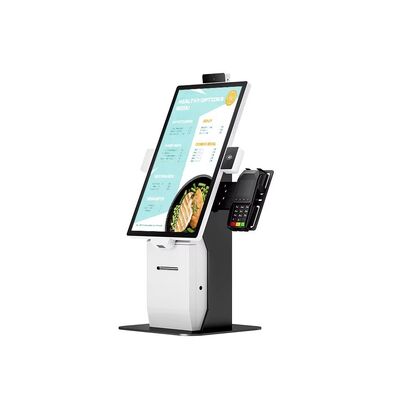
Some hotels may also use self-service terminals for check-in or other transactions. These applications require more than a touchscreen: the software, identity verification, payment functions and property management integration must all be planned appropriately.
For simpler information applications, an interactive directory may be enough.
When choosing a kiosk, operators should consider screen size, touch performance, operating system, mounting method and ease of cleaning. Equipment in public areas should be suitable for frequent use and easy for staff to maintain.
Centralized Content Management Makes Multi-Screen Operations Easier
A hotel may begin with a reception display and gradually add screens in restaurants, meeting rooms, elevators and outdoor areas.
As the network grows, updating each screen independently becomes less practical.
A centralized content management system can help authorized staff publish and schedule content across multiple displays. The hotel can distribute a property-wide announcement while allowing individual departments to manage their own information.
For example, the marketing team might manage brand campaigns, the events team could update conference schedules, and the restaurant team could maintain menu content.
Permissions should be planned carefully so that users can update the information they are responsible for without unintentionally changing unrelated screens.
Before deployment, buyers should confirm the CMS capabilities, supported operating systems, network requirements and any recurring software costs.
Choosing the Right Display Size, Brightness and Mounting Method
Hotel digital signage does not have one universal hardware configuration. Each location has its own viewing distance, lighting conditions and space limitations.
Screen size: Large lobbies and conference spaces may require large-format displays. Corridors, elevator lobbies and meeting room entrances may work better with smaller screens.
Brightness: Standard indoor displays are suitable for many interior spaces. Areas with strong sunlight or bright storefront glazing may require higher-brightness models.
Mounting method: Wall-mounted displays can save floor space, while freestanding screens may be easier to position in open lobby areas. Interactive kiosks need sufficient space for guests to approach and use them comfortably.
Operating hours: Displays expected to run for long periods should be selected according to their intended duty cycle and commercial operating requirements.
Connectivity: Network access and content delivery should be planned before installation, especially when displays are distributed across multiple floors or buildings.
These factors should be assessed together. Selecting a display based on screen size alone may lead to poor visibility, inconvenient installation or unnecessary cost.
Reliability and Maintenance Should Be Planned Early
Hotel displays operate in public environments where equipment failures can affect guest communication and the hotel's professional image.
A practical maintenance plan should cover cleaning, software updates, troubleshooting, spare parts and access to installed equipment.
Commercial-grade hardware intended for the expected operating schedule can help reduce avoidable operational issues. For high-traffic locations, buyers should also consider how quickly a screen can be serviced or replaced.
Standardizing display models across similar locations may simplify training, spare-parts management and future expansion.
Outdoor screens require additional attention to environmental protection and thermal management. Maintenance access should be considered during the initial installation design rather than after the equipment is already mounted.
How Hotels Should Plan a Digital Signage Project
Before selecting a supplier, hotel operators should define the project's main objectives.
Start by identifying the locations that need digital communication. Reception branding, meeting room schedules, restaurant menus and outdoor promotions may require different screen types.
Next, determine what information each display will show and who will maintain it. If content changes several times each day, centralized scheduling may be valuable. If a screen is used only for a welcome message, a simpler setup may be sufficient.
Hotels should also clarify whether the project needs integration with booking systems, event management software, restaurant systems or other platforms. These integrations can affect project cost, development time and ongoing support.
Finally, review installation, warranty, maintenance and expansion requirements. A system that meets today's needs should also be manageable if the hotel adds more displays later.
Choosing the Right Hotel Digital Signage Solution
Hotel digital signage can improve guest communication across reception areas, restaurants, meeting rooms, corridors and outdoor spaces. The right solution depends on the location, the information being delivered and the level of interaction required.
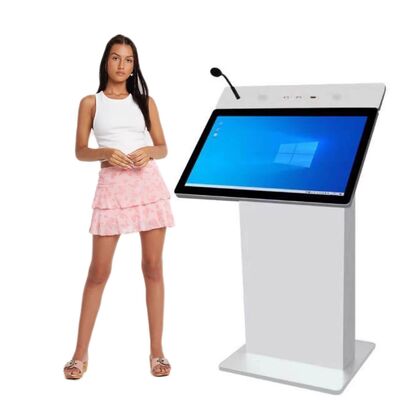
For lobby branding and general guest information, indoor standing digital signage can provide a freestanding display option. Where floor space is limited, indoor wall-mounted digital signage may be more suitable.
For entrances and other bright environments, a high-brightness digital signage display can help improve screen visibility. Hotels planning interactive guest directories or self-service applications can also evaluate an outdoor touchscreen ordering kiosk where the intended use and installation environment are appropriate.
For hospitality groups with multiple properties, consistent hardware, centralized content management and a clear maintenance plan can make the network easier to operate over time.
The goal is not to place a screen in every available space. It is to use digital displays where they help guests find information, understand services and navigate the property more easily.
When display selection, content design, software and installation are planned together, hotel digital signage becomes a practical part of the guest experience and the property's day-to-day operations.


 Your message must be between 20-3,000 characters!