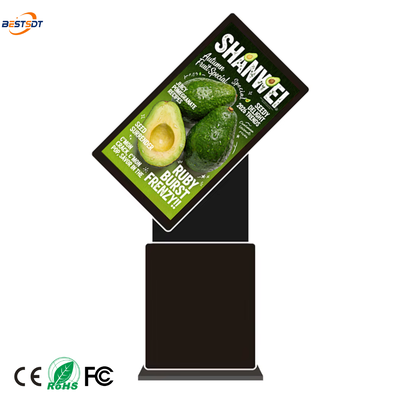
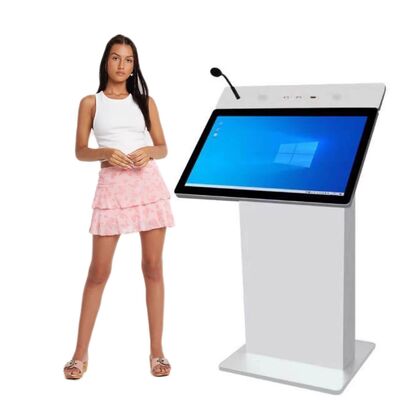
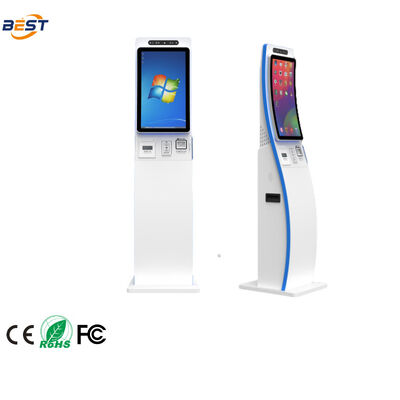
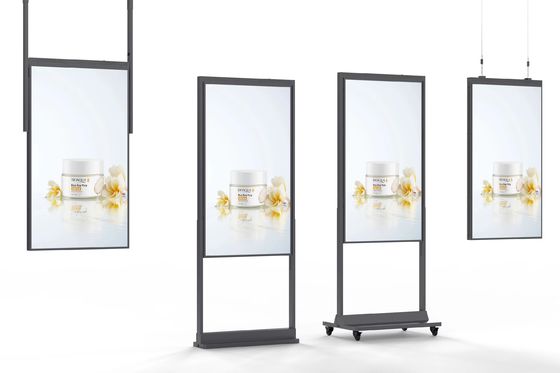
As a company selling floor standing outdoor displays for the past 15 years, I can tell you most buyers make three big mistakes; they buy the wrong brightness, they buy the wrong cooling and they buy the wrong enclosure. The outcome is invariably the same — the cover will look lovely for half a dozen months, then it begins dimming, yellowing or riding off. And the buyer calls to me and asks why.
This guide is for those purchasing floor-standing digital signage for parks, plazas, transit stops, tourist attractions or any public space where the screen literally sits on the ground. It goes over the seven decisions that decide if your screen is going to last 8 months or 8 years.
Decision 1: LCD vs LED — What Technology Should You Select for Your Floor-Standing Display?
The First Choice Is The Display Tech. There are two types of floor-standing outdoor displays — LCD and LED. On the outside, they appear alike but internally they operate drastically different and are meant for different applications.
Types of LCD Floor Stand Displays with LED Backlighted Liquid Crystal Panels They provide a high-quality image, high resolution and good colors at the near field distance (1-5 meters). Perfect for interactive applications, like Wayfinding & directories and information kiosks where the viewer is close to the screen. Standard sizes: 32 to 65 inches. Normal brightness: 500-3,500 nits
An LED floor-standing display is constructed with a grouping of separate LED pixels. They have immmensly high brightness (~ 5,000 – 10,000 nits) and can built as any size as you need but the pixels density is lower when viewing up close. Super great for big screens that are watched from a distance (more than 10m) — billboards, stadium screen, massive plaza displays. Pixel pitch is 2mm (fine, near viewing) to >10mm (coarse of distant viewing).
Rule: Use LCD — If your viewers are nearby (1-5 meters) and need to read or interact with text. If your audience is distant (more than 10 m) and the display large, pick LED. To err on the side of caution, for most floorstanding applications, LCD is the safest default because the vast majority of floorstanding displays are 32–65 inches and viewed from up close.
Another aspect to consider: LCD displays are completely standalone—the panel, backlight, cooling and media player all live inside the box. Driving LED displays requires additional processing hardware, and the cooling is a bit more complicated. LCD is much easier for any floor-standing use case since these are seldom space constrained.
Decision 2: Brightness — How Many Nits Do You Really Need?
The brightness is arguably one of the most misrepresented spec on outdoor displays This is everything I wrote about nits and brightness in full, but here are the short notes for floor standing displays:
Shady outdoors (under a canopy, under trees, north-facing): 1,000-1.500 nits The shade will limiting the ambient light, so therefore you do not need an extreme brightness. However even indoor (350-500nits) is not enough yet, outside ambient light is brighter than inside landscape such as shade.
Partial sun (morning or afternoon sun, not midday): 2,000–2,500 nits. Part of the day the screen must compete with direct sunlight. Anti-glare coating is essential.
If there is no shade and the sun is at noon, then full light (south-facing): minimum 3,000–3,500 nits. This is where typical buyers go lazy with specification. They buy a 2,000-nit screen, because it is cheaper (and looks fine in the afternoon) … at noon the screen is unreadable. The sunlight overpowers the display.
Desert or high-altitude sun (Middle East, Australia, places like Mt Everest): 4000-5000 nits These areas receive higher UV and light intensity than the temperate climates. A readable 3,500nit screen output in the Berlin sunshine may be unreadable in Dubai.
Ask for continuous brightness at highest ambient temperature, not maximum brightness fixed at 25°C! I addressed this in my RFQ article. A 2,500-nit screen at 25°C may be down to 1,800 nits at 50°C; if your location has summers with temps of +50°C you must specify brightness @ this temperature.
For example, I once had a client in Singapore that required a 2000 nit floor standing display for use in a park. The park was partially sunlit by trees and 2,000 nits should have been enough. But the screen was then planted in a location that only avoided tan-for-dirt contact by reflecting light off of a white building wall on the other side of that path. How bright was reflected light you might ask — about as bright!? Most of the time between 10 AM and 3 PM, the screen was just unreadable. We substituted a 3,000-nit display and the problem went away. The takeaway: reflected light matters as much as sun.
Decision 3: IP Rating — what level of protection will you need?
An IP (Ingress Protection) rating gives you an idea of how protective the enclosure is against water and dust. There are two ratings that apply to outdoor floor-standing screens:
IP54: Dust protected (not entirely dust-tight), protection against splashing water. That is the lowest for outdoor use, but I advise not to use it permanent outdoors. They will be protected from light rain, but not heavy rain, and dust will gather inside over time.
IP65: Dust tight and protected against water jets from any direction. This is the standard for exterior displays. Heavy rain, dust storms, and hose cleaning: Macbook Air is able to endure all of this. IP65 is the baseline if you are going to have that screen outside every hour of every day in all the weather.
IP66: Dust-tight and protection against heavy water jets. These are for severe weather, coastal territory with salt spray, monsoon rains or where the screen will certainly be cleaned up using high-pressure devices.
IP54 outdoors is not something I would recommend for a permanent outdoor installation. If the enclosure is not sealed correctly, I have seen IP54 screens fail after just one rainy season because water was able to get in via these ventilation holes. Generally, the price difference between IP54 and IP65 is only $200-$400 per screen — a fraction of the cost of replacing on damaged by water.
Note: the IP rating is for the housing and not for a full display solution. It does not matter how good an IP rating the system is if they are not sealed in place with cable glands, gaskets or access panels. When seeking an IP rating, ask the supplier how they achieve that—gaskets, potting or simply “it’s tight.” Without an explanation of what seals it, the rating is aspirational — not tested.
Decision 4: Cooling — Active vs Passive vs Hybrid
This is where the majority of floor-standing outdoor displays fail. In fact, the cooling system is what actually limits the lifespan of the screen more than any other component. There are three approaches:
Passive cooling (heat sinks, no fans): the enclosure uses aluminum heat sinks and thermal conductive materials to get rid of heat using zero moving parts. No fans to fail, no filters to replace… Pros: Quiet. Drawbacks: limited cooling capacity — only applicable with low-brightness displays (to 1,500 nits and under) in moderate climates. Passive cooling literally cannot keep pace in an ambient temperature of more than 40°C.
Actively cooled (with filters): There are fans in the enclosure that blow outside air through heat sinks and out of the enclosure. Pros: higher power, for high-brightness displays ( 2500 – 3500 nits) and hot countries. Cons: moving parts of fans that can fail, filter has to be cleaned (every few months 3-6) and the gaps from intakes/exhausts should be well designed, otherwise they allow dust/humidity through.
Type Hybrid (heat pipes + inter-coolers+conditioner): This ENclosure move heat from the panel to exterior with help of some heat pipes. These enclosure always use fans and sometimes AC unit in extreme conditions. Pros: most cooling power, can handle 4,000+ nits and 50°C+ ambient. Cons: most expensive, hardest to do, AC unit increases power consumption and requires maintenance.
Make the most common mistake: Acquire a poorly designed 2,500-nit display with passive cooling in a hot environment The panel overheats, the backlight gets worse, and the screen often fades within a year. I once had a client in Spain who did exactly this — purchased a passively cooled 2,500-nit display for a plaza in Seville where summer temperatures were 45°C. The brightness dropped to 1,400 nits within 14 months. The screen was unreadable under sunlight.
As a rule of thumb, if your display is 1,500 nits or higher and the ambient temperature could exceed 35°C, you require active cooling. Hybrid cooling is required, if your ambient can go beyond 45°C. So passive cooling is only for shaded, moderate-climate applications.
Decision 5: Optical Bonding — Yes or No?
Optical Bonding: Bonding the LCD panel with protective glass with optical adhesive to reduce air gap between both. I covered this in my RFQ article, but it’s so vital for a floor-standing display that it deserves its own section.
Absence of optical bonding (air gap): The air gap present between the LCD and the glass creates three issues. Reason one is reflection — light bounces off both the glass surface and the LCD surface, causing them to reflect two times which makes it difficult to read the screen in sunlight. Second is condensation — in humid conditions air gap moisture can condense on the LCD surface and fog it up. Third, vulnerability — when something hits the glass (be it a ball, rock, or vandalism), the LCD panel is directly behind the glass and can get damaged.
With optical bonding: The optical adhesive removes the air gap. Optical bonding 50–70% decrease in reflection (due to no second reflector). No condensation (no air gap) And the bonded glass also gives you impact resistance — a blow that would crack an unbonded LCD panel might only scratch the surface of the glass.
Optical bonding is simply not optional for all outdoor, floor-standing displays. It is on the ground, on display for the elements, and accessible to people. On its site, the price is $150-$400 per screen dependent on size. The other choice, a new display — such as an oddly-shaped fogged or cracked screen costs between $800 and $2,000.
If the quote does not speak to optical bonding, then it is assumed that it has not been included. Ask specifically. When the supplier states “we use tempered glass” — This is NOT optical bonding. This is the glass itself, as it comes from the processing: tempered glass; Optical bonding is the lamination process.
Decision 6: Vandalism Protection and Physical Security
Of all the digital signage types, floor-standing displays were least able to cope with vandalism. They are at ground level, they can be accessed still unoccupied. The display needs physical protection.
Tempered or laminated glass: Minimum 6mm tempered glass on the front. Use laminated glass (two sheets of glass with a sheet of plastic in between) — this is safer because when the glass breaks, it stays on the interlayer rather than falling out. For high-risk locations (public parks, transit stations), you shall use at least 8mm laminated glass.
Anti-graffiti coating: This is basically a sacrificial coating on the glass that can be washed with solvents and wiped down without damaging the underneath layer. The coating can be stripped and reapplied if anyone spray paints the screen. This adds $50-$100 per screen.
Reinforced enclosure: Minimum 2mm steel or aluminum box. So plastic cases could be broken or forced open. Test Port Access Panel (i.e., not a standard Phillips screw like you see on the pin in hex /Torx security screws) Cable entry should be at bottom or back location and not fromFront end.
Anchoring: The display must be grounded. A Floor-standing-40-80 kg, so is heavy to resist the wind but easy to push down by a person determined. Mounting points should exist on the basis to attach a minimum of 4 M12 anchoring bolts into a cement basis. Where the display is to be mounted atop a pedestal, the pedestal shall be welded to ground-mounted plates.
I also had a client once who was stationed in a park in that city and they did not anchor the displays. A gang had barged into one two weeks after it was installed and tipped it over. The glass cracked, the LCD panel was shattered, and the enclosure was dented. It explained that the repair cost $2,800—more than anchoring properly ($200 in parts and 2 hours of labor).
Decision 7: CMS and the Connectivity — How to Manage the Display?
But you still need a way to feed and manage content to the display. Outdoor Floor-standing Displays: These displays have their own requirements that are as follows:
Connectivity: Never almost any ethereal in outdoors places. Plan for 4G/LTE connectivity. The media player should have a built-in 4G module or a USB slot for a 4G dongle. Ask about the antenna — external antennas perform better than internal ones in metal enclosures. The SIM card should be accessible from the maintenance panel without opening the entire enclosure.
Remote management: The CMS should support remote diagnostics — not just content management. You should be able to check the screen’s status (on/off, brightness, temperature), reboot the media player, and monitor the network connection. For a deployment of 5+ screens, remote management is essential. Sending a technician to reboot a screen in a park costs $150-$300 per visit.
Scheduling and zoning: The CMS should support time-based scheduling (different content at different times of day) and screen zoning (dividing the screen into areas for different content). For example, a park display might show weather and event information in the top third, advertisements in the middle, and a scrolling text bar at the bottom.
Offline capability: If the network connection drops, the media player should continue playing the last received content playlist. It should not show a black screen or an error message. This is called “local caching” or “offline playback.” The media player stores content locally and only connects to the CMS for updates.
I’ve seen floor-standing displays that go black when the 4G signal drops. In a park, the 4G signal will drop — trees, terrain, and weather all affect signal strength. A media player without offline capability will show a black screen at least once a week. Make sure the CMS and media player support local caching.
FAQ
Q: How much does a floor-standing outdoor display cost? A: A 43-inch IP65 floor-standing display with 2,500 nits, active cooling, optical bonding, and a CMS typically costs $2,500-$4,500. A 55-inch with similar specs is $3,500-$6,000. The price range depends on panel grade, cooling type, and CMS features. Cheaper options exist ($1,500-$2,000), but they typically skip optical bonding, use passive cooling, or use B-grade panels.
Q: Can I use a floor-standing indoor display outdoors under a canopy? A: Not recommended. Even under a canopy, the temperature, humidity, and UV exposure are significantly different from indoors. An indoor display in a “sheltered” outdoor location will typically fail within 12-18 months. The cost difference between an indoor and outdoor display is $800-$1,500 — much less than replacing a failed indoor display.
Q: How often do outdoor floor-standing displays need maintenance? A: Active-cooled displays need filter cleaning every 3-6 months. Gaskets and seals should be inspected annually. Desiccant packs (if used) should be replaced annually. The glass should be cleaned monthly. Budget $100-$200 per screen per year for routine maintenance. I covered this in my maintenance article.
Q: What’s the lifespan of a floor-standing outdoor display? A: With proper specifications (correct brightness, IP65, active cooling, optical bonding), a quality outdoor display should last 5-8 years. The panel typically reaches 50% brightness after 50,000-60,000 hours of operation. The fans and power supply may need replacement at 3-5 years. Without proper specifications, expect 1-3 years.
Q: Can floor-standing displays be moved after installation? A: Yes, but it’s not trivial. The display needs to be unmounted from its anchor bolts, the power and data cables disconnected, and the display transported upright (laying it flat can damage the panel). Plan the location carefully before installation — moving a display after it’s installed costs $300-$600 in labor and may require a new foundation.
| Contact Person : |
Mr. Jack Zheng |
| Tel : |
+86 18682320109 |


 Your message must be between 20-3,000 characters!