I’ve been in this business long enough to know that corporate lobby projects are almost always driven by one person’s ego. Usually it’s the CEO, sometimes the marketing director, occasionally a consultant who sold the company on a “digital transformation vision.” The budget gets approved in a single meeting, the screens go up, and then six months later nobody can remember what’s supposed to be playing on them.
That sounds cynical, but I’ve shipped lobby displays for over a hundred corporate clients across 15 years, and the pattern is remarkably consistent. The good news is, when these projects work, they really work — a well-executed lobby display setup changes how people feel about your company the moment they walk in. I want to talk about what makes the difference.
The Lobby Screen That Nobody Watched
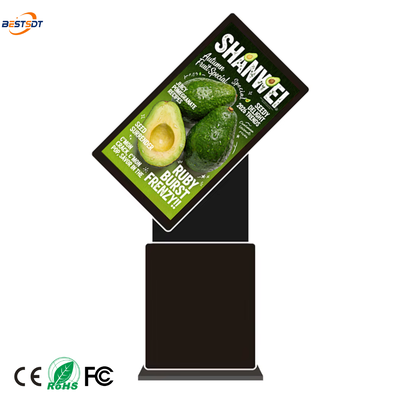
Let me get the failure out of the way first. 2022, a tech company in Singapore, new headquarters, 14 floors. They ordered three 65-inch floor-standing digital signage units for the main lobby — one behind the reception desk, two flanking the entrance to the elevator bank. Beautiful hardware, bright, crisp. We shipped them, their AV integrator installed them, and I flew out for the launch.
The launch was fine. Champagne, speeches, the CEO cut a ribbon. The screens were running a slick brand video — you know the type, slow drone shots of the office, employees smiling at laptops, words like “innovation” and “synergy” fading in and out. Looked great on day one.
I came back eight months later for a separate meeting and walked through the lobby. Same brand video. Still looping. The receptionist told me nobody had updated the content since the launch. The screens had become furniture — people walked past them without looking. Eight months of the same drone shots.
The problem wasn’t the hardware. It never is. The problem was nobody owned the content. The marketing team had produced the launch video, considered the project done, and moved on. Nobody was assigned to refresh it.
What Actually Catches Attention in a Lobby
After a hundred of these projects, I can tell you what makes visitors stop and look:
Movement, not brightness. A lobby is already well-lit. You don’t need 5,000 nits indoors. What makes people look is content that changes — not every 10 seconds, but meaningfully. A live data visualization. A social media wall. A welcome message with the visitor’s name (if you’ve integrated with the booking system).
Relevance, not production value. The Singapore company’s brand video had high production value and zero relevance to anyone walking through the lobby. A simple screen showing today’s meetings, which conference rooms are in use, and the wifi password would have gotten more eyeballs.
One big idea per screen, not a dashboard. I’ve seen lobbies where someone tried to cram eight widgets onto one display — clock, weather, news ticker, stock price, meeting room status, social feed, company logo, event calendar. You can’t read any of it from across the lobby. Pick one thing per screen and make it big.
The Transparent Display Project in Shenzhen
This is one of my favorites. A consumer electronics company in Shenzhen — they make smart home products — wanted something different for their new product showroom. Not another video wall. They’d seen transparent LCD screens at a trade show and wanted to try it.
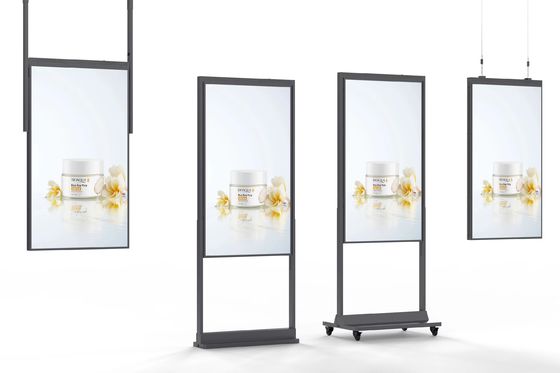
The concept was simple: physical products displayed behind glass shelves, with a transparent LCD overlay showing product specs, animations, and feature callouts. When the screen content changes, it looks like the product itself is glowing. When the screen is off, you just see the product through the glass.
We shipped four 22-inch transparent panels and two 49-inch ones. The installation was fiddly — the alignment between the physical product behind the glass and the digital overlay on the screen had to be precise, and the lighting in the showcase area needed to be tuned just right. I spent two days on site adjusting things.
The result was genuinely impressive. I watched visitors walk in and gravitate toward the displays like they were something out of a sciency fiction movie. People would stand there for a full minute, which in a showroom is an eternity. The client ended up ordering six more units for their other offices.
The catch with transparent displays: they’re not bright. The transparency comes at a cost — you lose a lot of light output. They work great in controlled indoor lighting, which is what a showroom or lobby is. But you can’t use them near windows or in areas with strong ambient light. I had to explain this to a client last year who wanted to put one in a glass-walled atrium facing south. I told them it would look like a faint shadow with some text on it. They didn’t believe me. We installed it anyway. They called me a month later asking why it was so dim.
The Touch Table That Confused Everyone
Another story, one that still makes me cringe a little. 2023, an automotive company’s headquarters in Germany. They wanted a touch screen table in their waiting area — the idea was that visitors could browse car models, configure colors, and explore interior options while waiting for their meeting.
The hardware was great. 43-inch multi-touch, PCAP, super responsive. The problem was the software. The agency that built the configurator app designed it like a desktop application — tiny buttons, nested menus, a settings page. People sat down, poked at it for 10 seconds, couldn’t figure out how to get started, and went back to their phones.
Touch tables in lobbies need to be treated like kiosks, not like computers. Big targets. One clear action per screen. No menus. If someone has to read instructions to use it, the interface has failed.
The automotive company eventually redesigned the app — full-screen car images, swipe to rotate, tap a color to change it, tap a button to save the configuration and email it to yourself. That version worked. Visitors actually used it. But they had to learn the hard way that “interactive” doesn’t mean “put a desktop app on a table.”
Digital Podiums for Conference Rooms
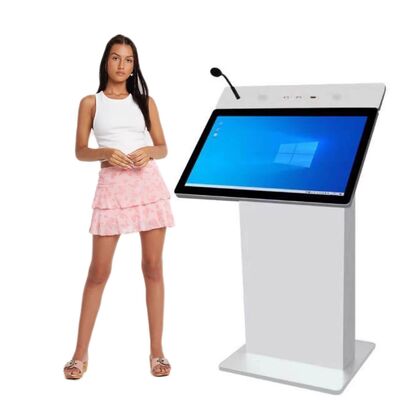
I’ll mention these quickly because they’re a smaller category but one that’s growing. Digital podiums — those lectern-style units with an embedded touch screen — are showing up in corporate auditoriums and large meeting rooms. The screen faces the speaker for notes and slide control, and some models have a second screen facing the audience showing the slide content.
The reason I mention them is that I keep seeing companies buy them for the wrong reason. They buy a digital podium because it looks impressive in a boardroom. But nobody uses it because the speaker already has a laptop and a clicker, and the podium’s software isn’t compatible with their presentation format, or the IT department hasn’t set up the connection, or the speaker just doesn’t want to learn a new tool five minutes before their presentation.
If you’re buying a digital podium, make sure someone on your team is going to actually use it and champion it. Otherwise it’s an expensive piece of furniture that the AV team has to dust.
CMS: The Thing I Keep Saying
I know I said this in a previous post, but it’s even more true for corporate lobbies. The CMS is the project. Not the screens. Not the installation. The CMS.
Your marketing team or office admin needs to be able to walk up to a computer, log into a dashboard, and change what’s on the lobby screens. Today. Right now. Without calling the AV integrator. Without opening a support ticket. Without waiting three weeks for the IT department to “provision access.”
If the CMS is hard to use, your screens will run the same content for eight months. I’ve seen it happen. I’ve been the person walking through the lobby eight months later seeing my own company’s launch content still looping.
Content Ideas That Actually Work
I’ll keep this short because content strategy isn’t really my job — I build the hardware. But here’s what clients have told me works:
- Welcome messages with visitor names, pulled from the meeting booking system
- Live company metrics (sales counter, social media follower count, customer satisfaction score)
- Social media wall — tweets and posts mentioning the company, moderated
- Employee spotlights — rotating profiles of team members, “meet the team” style
- Event countdown — days until the product launch, conference, annual meeting
- Local weather and transit info for visitors from out of town
- Company history timeline — especially effective on transparent displays in older companies
The common thread: it changes. It’s relevant. It gives a visitor a reason to look.
What I’d Do If I Were Starting a Lobby Project Today
I’d buy one screen, not five. Put it in the spot where visitors naturally pause — the reception desk, the elevator waiting area. Run it for a month with different content types and see what people actually look at. Then expand.
I’d assign content ownership before the screen arrives. One person. Named. Accountable. Not “marketing will handle it” — a specific human being whose job includes updating the lobby screens.
And I’d spend more time on the CMS demo than on the hardware spec. The hardware is solved — any reputable manufacturer can build you a bright, reliable lobby display. The CMS is where projects live or die.
FAQ
Q: What size screen do I need for a corporate lobby? A: Depends on the viewing distance. Reception desk area where visitors stand 2-3 meters away? 43 to 55 inches. Elevator bank where people stand 5+ meters away? 65 inches minimum. Don’t go bigger than you need — a 75-inch screen in a small lobby feels like a billboard, not a design element.
Q: Should I use a video wall instead of a single large screen? A: Only if you have specific content that needs the aspect ratio or if you’re trying to make a visual statement. Video walls cost 3-4x what a single screen of equivalent size costs, in hardware, installation, and ongoing calibration. For most lobbies, a single 65 or 75-inch display does the job.
Q: How do I keep content fresh without dedicating a full-time person to it? A: Use a CMS with content scheduling and templates. You should be able to schedule a month of content in an afternoon — set up the templates once, swap in new images or text as needed. If your CMS requires manual uploads for every change, you need a different CMS.
Q: Are transparent displays worth it for a lobby? A: If you have physical products or objects to display behind them, absolutely. They’re memorable and different. If you just want to show video content, skip the transparent display and use a regular screen — it’ll be brighter, cheaper, and easier to maintain.
Q: What’s the biggest mistake you see in lobby projects? A: Buying hardware before assigning content ownership. Every time. The screens go up, everyone celebrates, and then nobody updates the content. I’ve walked through lobbies where the screens are showing content from two years ago. The hardware is fine. The project failed because nobody owned it.
I’ve shipped lobby and showroom displays to corporate clients in 30+ countries. If you’re planning a lobby project — one screen or twenty — tell me what you’re trying to achieve and I’ll tell you what I’d actually recommend. BEST Technology manufactures floor-standing signage, transparent displays, touch tables, digital podiums, and portable units, all with OEM/ODM customization and CE/FCC/RoHS certification.


 Your message must be between 20-3,000 characters!